

Airflow 3.0. improvements to event driven scheduling
Why sensors and data-aware scheduling fall short, and how Airflow 3.0's poll-based event-driven scheduling will improve the way we structure DAGs
As the release date for Airflow 3.0 is coming I can’t help but feel excited about the huge pivot that is being developed for the tool that has been the bread and butter of my data engineering workflows.
The thing I’m most excited about is the implementation of poll based event driven scheduling.
Here are some of the words that Vikram Koka, the Chief Strategy Officer at Astronomer shared with us in the recent Airflow Forum in London:
We want to be able to run tasks at any time. With data driven scheduling and datasets, we enable DAGs to be run based on data within a single Airflow deployment.
I’m tremendously excited to be able to say that with Airflow 3, we want to expand that to full event driven scheduling, where DAGs can be run based on data showing up from external data systems.
A table is updated in a Snowflake database, a new file is created in S3, and your DAG starts running.
We want Airflow to be able to respond to your entire data ecosystem. Not just within the confines of Airflow itself.
Statements like this make me feel very hopeful about what the future of Airflow is going to look like.
In this blog post I’m going to express my frustrations with the current system, and explain how the new poll based event driven scheduling will fix those frustrations.
Event driven orchestration in Airflow 2
In the current state of Airflow, the only possible way you could get a DAG “triggered” by an external system is by either using sensors or data-aware scheduling.
Both sensors and data-aware scheduling have very limited functions and oftentimes when I use them I’m left with a feeling of slight dissapointment.
I feel that there is just something missing from those two mechanisms, a small improvement that could unleash their full potential, a link missing between them…
Sensors
Sensors in Airflow are a type of specialised task designed to wait for a specific condition or event to occur. They are used to block further execution of the DAG until a specific condition is met.
A simple example of a sensor would be, a sensor that waits on a file to be uploaded in a Google Cloud Storage in order to proceed with pipeline execution.
When to use Apache Airflow sensors
Let’s picture a workflow where this could be useful.
You’re building a BigQuery data warehouse for a client. At one point the client comes up to you and says: “We have some spreadsheet reports that we build ourselves and we’d like to have them available in BigQuery for easier analysis and retention.”
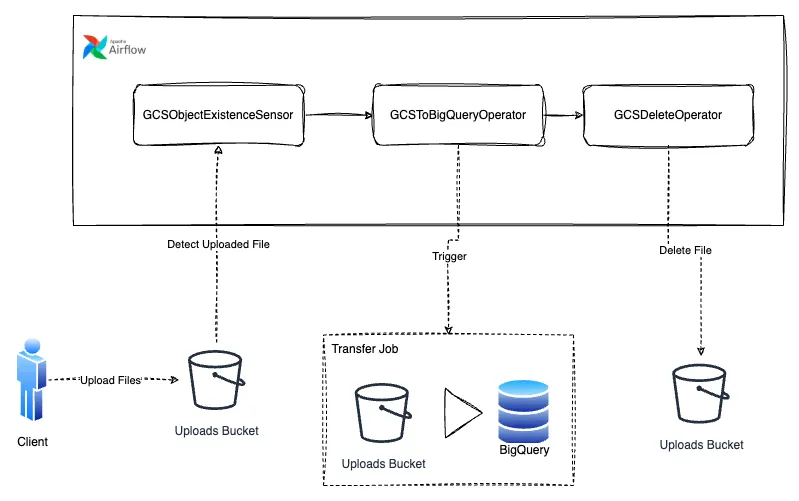
The next step is to devise a simple workflow that would transfer the data from the clients hands into BigQuery:
- The client will upload the data into a cloud storage bucket periodically.
- The upload will be detected by our sensor.
- A Cloud Storage to BigQuery transfer will upload the data from Cloud Storage to a BigQuery table.
- The file will be deleted to prevent data accumulation.
The workflow can then be built as an Airflow pipeline following the diagram
Diagram of the sensors pipeline for event-driven scheduling
The downside of sensors
While this pipeline is certainly going to work, the issue I have with it, is that the DAG itself is not run by the GCSObjectExistanceSensor, its execution is merely blocked by the sensor until the condition it checks for has been fulfilled, so there needs to be an added mechanism that would actually start the DAG.
This opens up another problem, the standard way of running Airflow pipelines is by scheduling them, binding them to a certain timetable, but humans don’t conform to timetable, much like the client in this scenario cannot be trusted to upload his reports everyday before 1 p.m.
While a solution in Airflow exists for these kinds of situations, it is not really something I would call elegant. The proper way to trigger this DAG would be by using the ContinuousTimetable mechanism in order to re-trigger the DAG once it finishes with execution.
@dag( start_date=datetime(2023, 4, 18), schedule="@continuous", max_active_runs=1, catchup=False,)This builds a very confusing mental model of how the DAG actually works that is not immediately visible by the inexperienced Airflow user, and a wrong mental model is not something you want to have at 1 in the morning trying to figure out why your pipeline is failing.
Data aware scheduling
The Airflow documentation page on data-aware scheduling explains it like this:
In addition to scheduling DAGs based on time, you can also schedule DAGs to run based on when a task updates a dataset.
from airflow.datasets import Datasetexample_dataset = Dataset("s3://dataset-bucket/example.csv")After reading this for the first time my hopes got up, I was expecting data-aware scheduling to be the solution to all my data driven requirements, but as I continued reading I got slightly disappointed.
Airflow makes no assumptions about the content or location of the data represented by the URI, and treats the URI like a string.
What this tells us is that Airflow datasets are not actually datasets, and the data-aware scheduling isn’t really aware of any data. The dataset is only a conceptual representation of data in Airflow, and it is used to create dependencies between DAGs, basically only allowing you to break down a large DAG into multiple smaller ones, making sure that they run consecutively.
example_dataset = Dataset("s3://dataset/example.csv")
with DAG(dag_id="producer", …):  BashOperator(task_id="producer", outlets=[example_dataset], …)
with DAG(dag_id="consumer", schedule=[example_dataset], …):
Diagram of a pipeline triggered by Airflow datasets
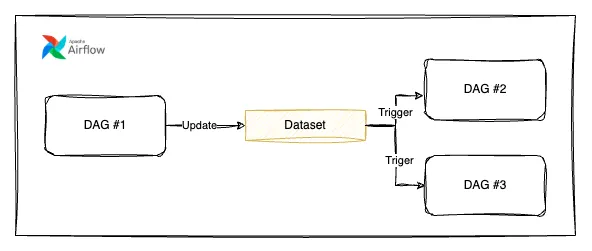
…Which is certainly a good start to building a data aware system, but not what I really had in mind.
How I expected data aware scheduling to work
But what if we could combine the two mechanisms, the concept of sensors and the concept datasets, to somehow allow for external services to notify airflow about events occurring in datasets.
How I expected data aware scheduling to work in Airflow
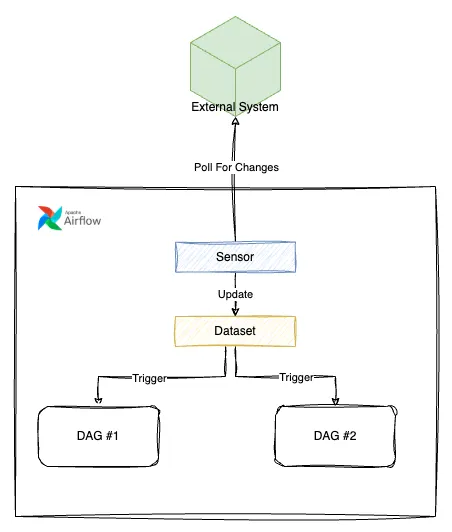
And from the features that have been planned in Airflow 3 it looks like my prayers have been answered, and this will be delivered under the name: event driven scheduling.
Event driven scheduling in Airflow 3
The goal of event driven scheduling in Airflow is be to automatically update Datasets based on external events. Poll based scheduling is going to be the driving mechanism behind this feature.
A poll based scheduling mechanism will allow for constant monitoring of the state of an external resource. Whenever the external resource reaches a given state a Dataset will be updated. Which sounds pretty similar to what I had in mind.
One example of how this would work for detecting that a file was uploaded to a GCS bucket:
trigger = GCSFileUpdatedTrigger(gcs_file=”<gcs_file_uri>”)dataset = Dataset("<gcs_file_uri>", watchers=[trigger])
with DAG(  dag_id=DAG_ID,  schedule=dataset,  start_date=datetime(2021, 1, 1),  tags=["example"],  catchup=False,):  empty_task = EmptyOperator(task_id="empty_task")  chain(empty_task)
While poll based scheduling does come with a price of resources that are going to be used during the constant checks assessing the state of an external resource, having them implemented as asynchronous triggers (rather than pure sensors) will make the resource usage increase unnoticeable for the average user.
This section presents only the core information from the official Airflow Improvement Proposal, if you wish to find out in more detail how the system actually works, I strongly suggest you check the doc out.
Conclusion
I feel very excited that Airflow is pivoting from its core model of being a time-based and dependency-based workflow scheduler in order to adopt and keep up with the more modern market requirements, where systems are required to act in a timely manner to events from various sources.
This is a great step for the Airflow community and it can lead us to only imagine what is to come in the future.`